Quick one here…I was recently setting up a SSRS 2008 dev environment integrated with a MOSS 2007 dev environment and encountered some strange problems with the SSRS 2008 Add-In for SharePoint. Basically every time it would run and state the installation was “interrupted” and nothing was changed. To my frustration nothing appeared to be wrong with the MOSS or SSRS setups however I did notice an error in the event viewer related to access to the SQL Server database. It turns out that wasn't the problem either. There seems to be an issue with the rsSharePoint[_x64].msi installer as mentioned in Prash's blog here (blogs.msdn.com/prash/…)
To overcome this hurdle you must follow the following steps:
- Open a command prompt with “Run as Administrator…”
- Run rsSharePoint.msi SKIPCA=1.
- Locate rsCustomAction.exe file on the file system. This file is copied to your computer by rsSharePoint.msi and is generally located in the C:UsersYourUserNameAppDataLocalTemp directory.
- Run rsCustomAction.exe /i
You will see lots of messages similar to those below in the command window but it will eventually finish and you're setup of the SSRS 2008 Add-In for your MOSS 2007 environment will be complete.
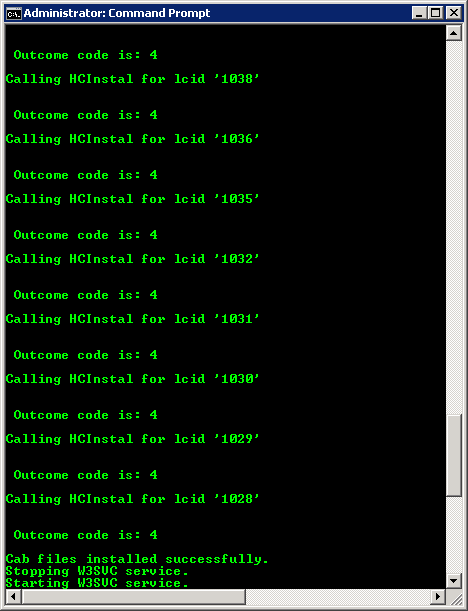
Hope this helps!
Make sure you download the latest version of the SSRS add-in…I dealt with this today 🙁
www.microsoft.com/downloads/details.aspx?FamilyID=58edd0e4-255b-4361-bd1e-e530d5aab78f&displaylang=en
That worked..!
It appears that if you have a farm, like I do, and you have Sharepoint on one machine and Reporting Services on another machine (and another instance of SS), you have to have the full install on one machine, and “files only” on the other. Which one gets the full install? The sharepoint machine? Or the SSRS machine? Here’s the wording:
“…When installing the add-in on servers after a SharePoint product or technology has been installed, you can run the full add-in installation on only one of the SharePoint servers. For the other SharePoint servers in the farm, you must run the files only installation of the add-in from the command line. The files-only installation installs the files but skips the custom actions section of the installation process…”
Thanks!
Okay, apparently I put the full install on the Sharepoint machine and the files only on the report server, yes?
But now, when I try to run rsCustomAction /i, it says:
2011-11-10 11:54:10: SSRSCustomActionError: Could not load file or assembly ‘Microsoft.SharePoint, Version=14.0.0.0, Culture=neutral, PublicKeyToken=71e9bce111e9429c’ or one of its dependencies. The system cannot find the file specified.
How do I tell it to look on another machine for Sharepoint?
Thanks,
My bro saved this webpage for me and I have been going through it for the past couple hours. This is really going to help me and my classmates for our class project. By the way, I enjoy the way you write.
Breathtaking designing, finally revealed the place for fascinating background images